
The short version
- Stage the main living and dining space, the primary bedroom and any den; bathrooms and halls rarely need it.
- Zone an open plan with furniture at true size, keeping the window line clear.
- Leave the view, the glass, the railings and every fixture exactly as photographed.
- On a balcony, add only unattached furniture or decor.
- Do not stage a unit that is pre-construction or under construction for a Stellar listing.
- Disclose staged photos in the Stellar listing fields.
Does the unit need staging?
Three situations come up again and again downtown. A vacant unit, after a move-out or an investor resale, is the clearest case for virtual staging. An occupied or tenant-furnished unit can be restaged with furniture removal and staging, as long as everything that conveys stays in the photo. A furnished unit that already photographs well may need nothing more than photo enhancement.
Choose the rooms
Pricing is per photo, so choose photos, not rooms. One strong angle of the main living and dining space, the primary bedroom and any den or second bedroom usually tells the story of a downtown unit. Kitchens with built-in cabinets often need only a few decor items or none. Bathrooms, halls and laundry closets rarely need staging at all.
Zoning an open plan
An empty unit with living, dining and kitchen along the glass can read as one long room. Staging divides it into zones a buyer can understand:
- a seating group that faces the room's natural focus, often the window or a wall for a TV;
- a dining table close to the kitchen, sized for the space between the kitchen and the seating;
- a clear walking path between the zones and to the balcony door.
Keep furniture below the window line so the glass and the view stay visible. Every piece is drawn at the size the room can really hold.
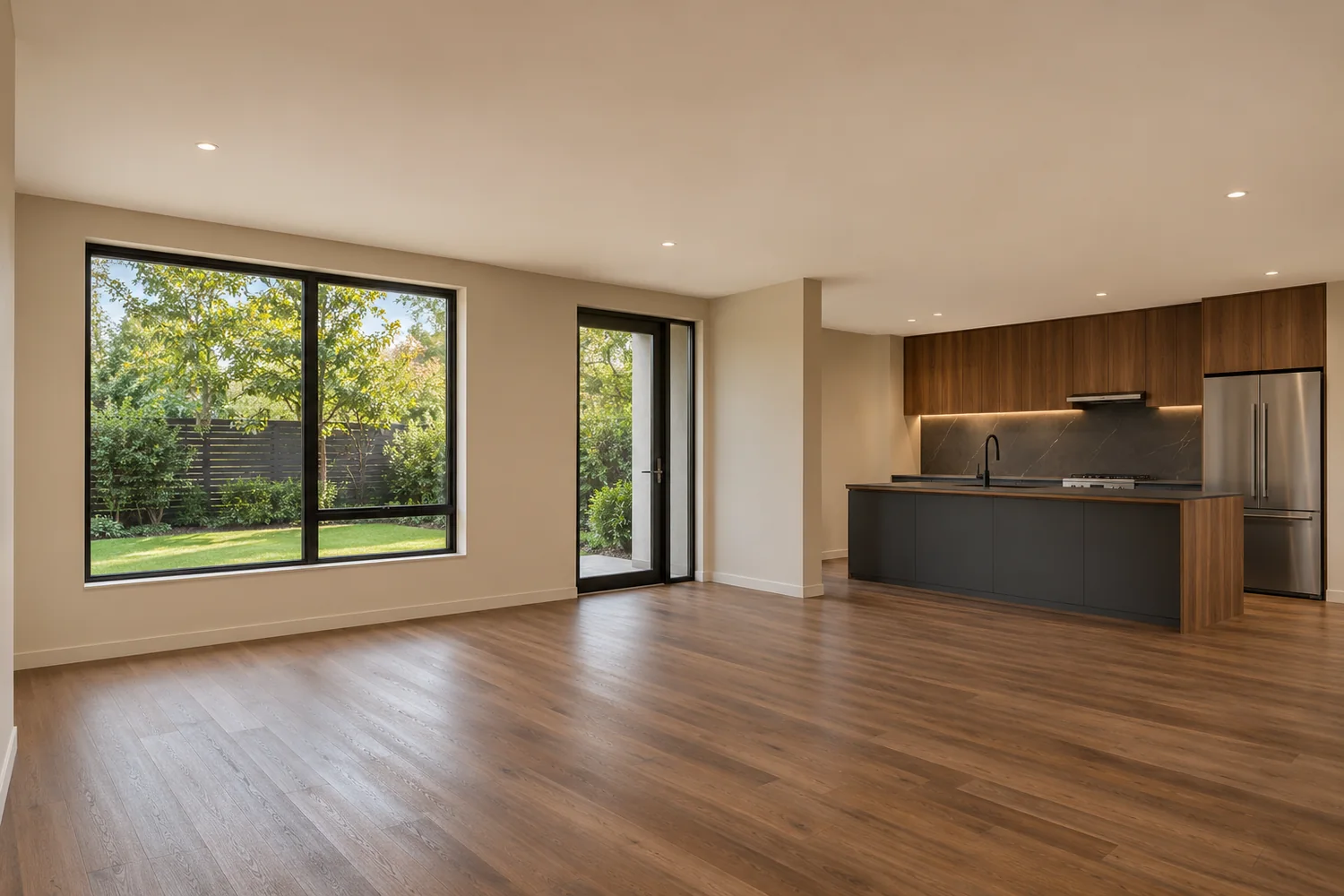
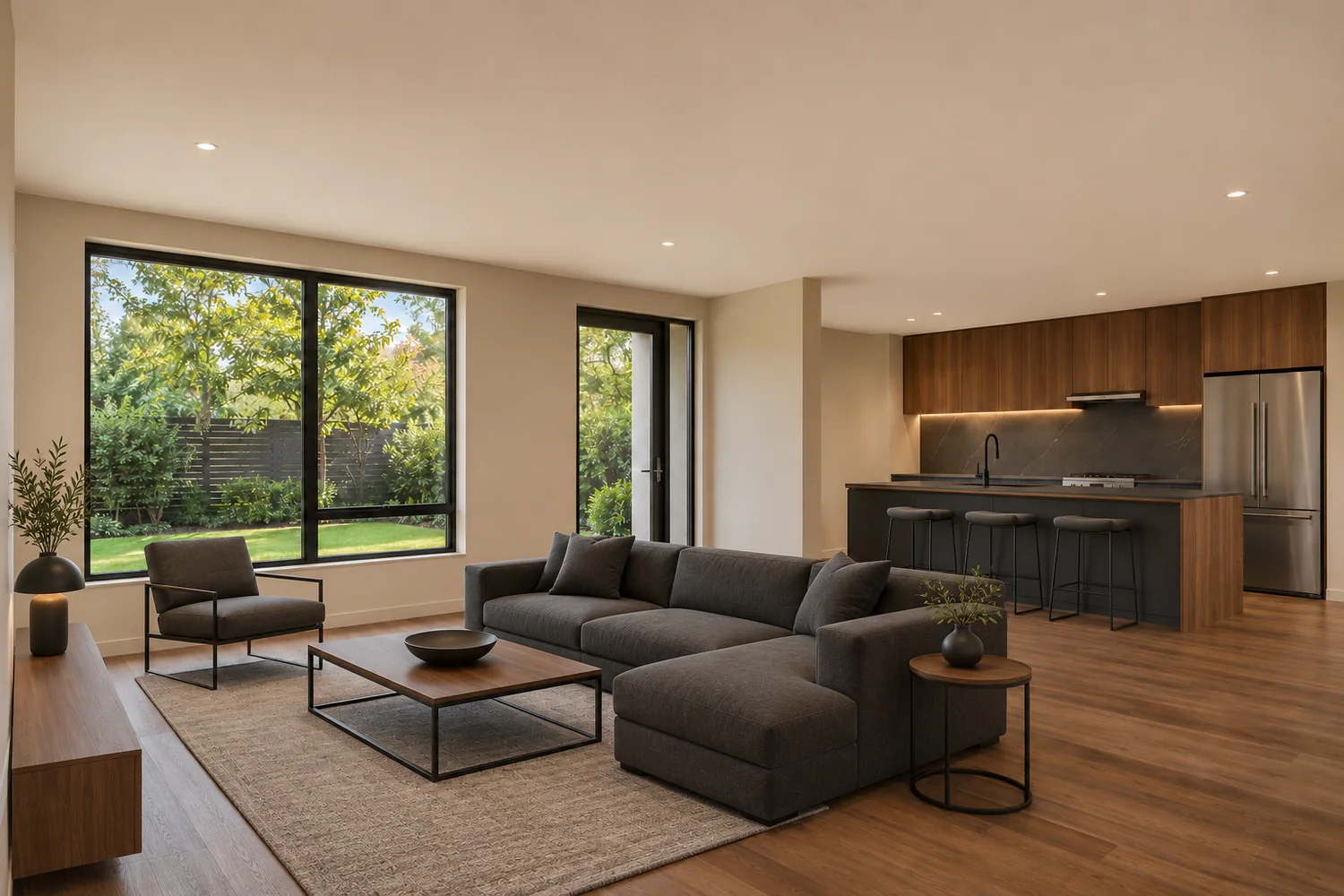 BeforeAfter
Studios and small units
Studios and one-bedroom units show the empty-room problem most: with nothing in the photo, there is nothing to judge the size by. The temptation is to use small furniture so that more fits. Stellar MLS prohibits distorting a room's dimensions and gives undersized furniture as its example, so the answer is fewer pieces at true size: one zone each for sleeping, sitting and eating. A den is shown as an office or reading room only when that is a fair use of the space, and never as a bedroom unless the listing describes it as one.
Balconies and terraces
A balcony photo is an exterior photo. Stellar allows exterior photos to show added unattached furniture or decor only: a small table and chairs, an outdoor rug, a planter. Railings, glass, flooring, privacy screens and the view beyond stay exactly as photographed. For views and twilight shots, see the waterfront photo guide.
New towers and resales
Two rules shape staging in a new tower. First, Stellar's Article 04.04 does not allow virtual staging on pre-construction or under-construction properties, so staged listing photos wait until the unit is complete. Second, once units are finished, several units with the same floor plan can be on the market at the same time.
- ReportedTwo downtown towers of 46 and 42 stories brought a combined 545 condos downtown, with both buildings welcoming their first buyers in late 2025.Source: St. Pete Catalyst, "St. Pete's luxury condo market faces a new reality" (November 5, 2026)
That is a market fact, not a measure of what staging achieves, and no result is promised. Where many units share floor plans, a seller may want a unit's photos to read differently from a near-identical one. Staging can help through style and furniture choices only: the layout, the finishes and the view stay exactly as they are. Several units with the same plan are best staged with one honest, consistent direction per unit rather than a dramatic transformation. See choosing a staging style.
Rentals
Downtown is no longer mainly a condo market. The Downtown Partnership describes a shift toward a mix that includes townhomes, rentals, and workforce and affordable units, and it lists a 33-story rental tower with 268 units among its development highlights. A rental listed in Stellar MLS follows the same staging rules and disclosure as a sale listing. Other rental platforms have their own rules; check each one before publishing staged photos. More in the rentals guide.
- VerifiedThe Partnership describes downtown housing as shifting "from primarily being a condo market" to a mix that includes townhomes, rentals and workforce and affordable units.Source: St. Petersburg Downtown Partnership, By the Numbers
- VerifiedA 33-story apartment development with 268 rental units, from studios to two-story penthouses, is listed among the Partnership's development highlights.Source: St. Petersburg Downtown Partnership, Development Highlights
Building types by area
Building types vary across Downtown: newer condo and rental towers along Central Avenue in the Downtown Core, units facing the bay and waterfront parks along Beach Drive, mid-rise and mixed-use new builds in the EDGE District, and older and mid-rise buildings in North Downtown. The Areas page shows where Downtown begins and ends.
What must stay exactly as shot
Disclosure
In Stellar MLS, virtually staged photos need three things: "Virtually staged" in the photo description, the virtually staged field checked, and public remarks that begin "One or more photo(s) was virtually staged." The disclosure is the listing agent's responsibility. Virtual staging disclosure in Florida (stageliora.com)
Photographing an empty unit
Good staging starts with a good original. These points are specific to downtown units; the main site's photo preparation guide covers the basics for any home.
Before the shoot
- Confirm the unit is finished. Stellar does not allow staging of pre-construction or under-construction properties.
- Clean the glass inside; streaks show more in a staged photo than in an empty one.
- Turn on the lights that exist, and open the blinds or shades you want shown open.
Angles for an open plan
- Shoot from a corner or the entry, level, so that the floor is visible all the way to the glass.
- One angle that shows the living and dining zones together usually works better than two tight shots.
- Avoid extreme wide angles: they stretch the room, and staging drawn at true size will then look small.
Glass, glare and the view
- Expose so the window detail is not blown out. Enhancement can only work with what the file captured; a view that came out white is never painted in.
- Avoid shooting straight into low sun; it creates glare and flare across the glass.
- For a balcony photo, note which way it faces. It matters for any twilight edit.
Files and rights
- Send the largest JPG or PNG files you have, by email; a file-sharing link can be agreed for larger sets.
- Send only photos you have the right to have edited, for example where the photographer's license allows it.
- With each photo, note the room type, the zones to show and anything that must stay visible.
Checklist before you publish
- The view, glass and railings match the original exactly
- Furniture is at true size; nothing makes the unit look bigger
- Built-ins, fixtures and anything that conveys are still there
- Balcony staging is unattached furniture or decor only
- The unit is finished, not pre-construction or under construction
- The Stellar disclosure fields and remarks are completed
- The unedited originals are kept
Questions
Can I stage a unit before the tower is finished?
Not for Stellar MLS listing photos. Article 04.04 says virtual staging shall not be used for pre-construction and under-construction properties.
Can a den be staged as a bedroom?
Only if that is a fair use of the space and consistent with how the listing describes it. Otherwise show it as an office or reading room.
Can staging make my unit stand out from an identical one?
Only through style and furniture choices. The layout, finishes and view stay exactly as photographed.
Who will do the work?
Devender Garg, remotely from India. You receive a written quotation before any work or payment.
Sources
Market facts are dated reports about the market, not measures of what staging achieves.
- St. Pete Catalyst, "St. Pete's luxury condo market faces a new reality" (November 5, 2026) — read November 18, 2026
- St. Petersburg Downtown Partnership, By the Numbers — read November 18, 2026
- St. Petersburg Downtown Partnership, Development Highlights — read November 18, 2026
- Stellar MLS, Article 04.04 and the Stellar photo rules page — read November 19, 2026